 Yield Lens
Know a rental's numbers before you fall for the photos.
Yield Lens is a Chrome extension. It shows cash flow, cap rate, cash-on-cash return and stamp duty right on Zillow, Redfin, Rightmove and Domain listings, for the US, UK and Australia.
Free on the Chrome Web Store. Pro comes with a 7-day free trial, no card required.

Instant investment metrics
Monthly cash flow, cap rate, cash-on-cash, gross and net yield, mortgage payment and total cash needed, all calculated from the listing you are viewing.
Local tax rules built in
UK SDLT, Scottish LBTT and Welsh LTT including second-home and non-resident rates, Australian transfer duty for every state with foreign-buyer surcharges, and US property tax by state.
Every input adjustable
Change price, rent, rate, deposit, vacancy, management or maintenance and every figure updates live. Set your own defaults per country.
Stamp duty and overseas-buyer surcharges, included

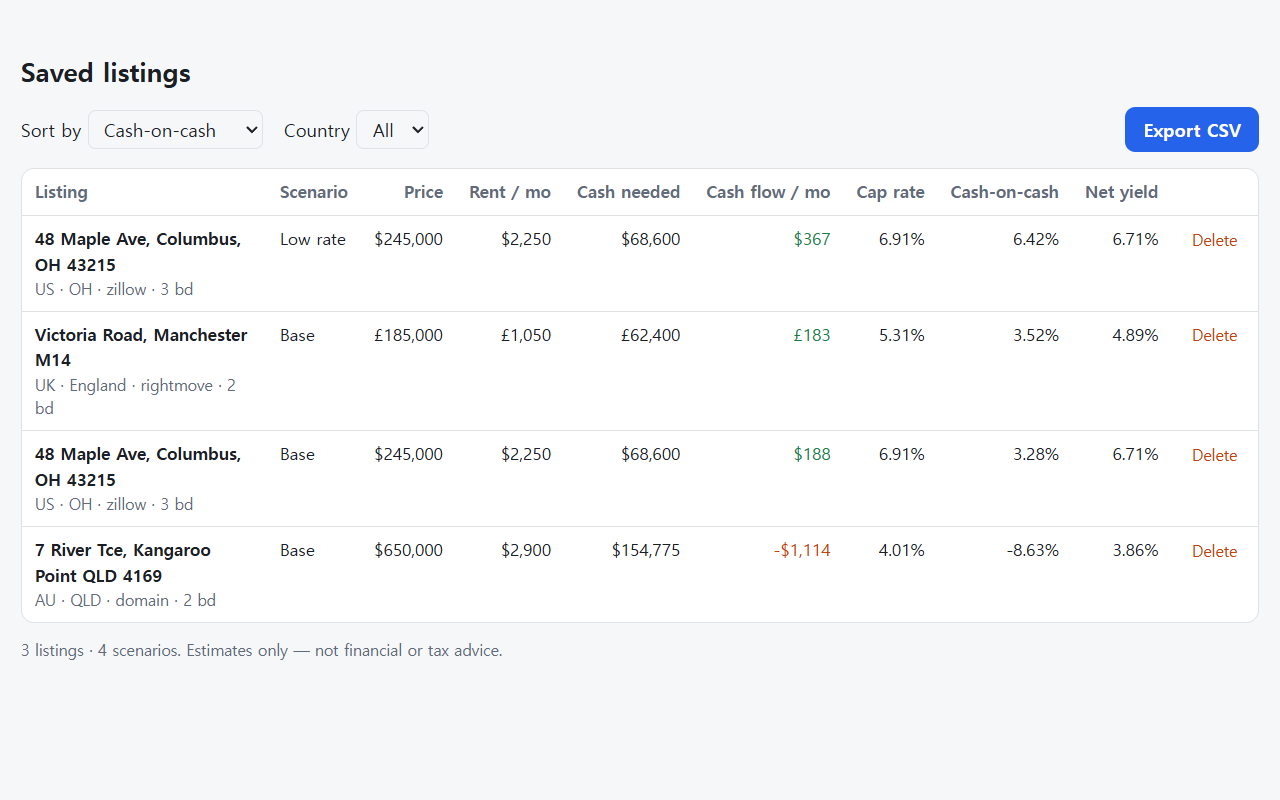
Save and compare listings (Pro)
Pricing
Free
- Calculator panel on every supported listing
- US, UK and Australian tax rules
- Custom default assumptions
Pro
- Everything in Free
- Save listings and compare them side by side
- Multiple scenarios per property
- Export to CSV (Excel, Google Sheets)
- 7-day free trial with no card required
US$6.99 per month, billed monthly. The price includes any applicable VAT, GST or sales tax, so there is nothing extra at checkout. Cancel anytime. Full refund within 14 days of your first payment. See the refund policy.
FAQ
Which sites does it work on?
Zillow and Redfin (US), Rightmove (UK) and Domain (Australia), on for-sale listing pages.
Is my data sent anywhere?
No. Listing data is processed only in your browser. Pro checks your license key with our payment provider. See the privacy policy.
How do I activate Pro after paying?
After checkout you're returned to our activation page, which turns Pro on automatically. Your license key is also emailed to you, and you can paste it in the extension's settings.
Is this financial advice?
No. All figures are estimates based on the listing and your inputs. Always verify with qualified professionals.